NFC checkpoint verification
Guards tap the phone against NFC tags installed at each patrol point. The checkpoint is logged instantly with no codes to type.
StudioGuard Tour turns a mobile phone into a reliable patrol device. NFC checkpoints, GPS locations, timestamps, photos and notes are captured throughout the tour, with a complete patrol report emailed on completion.
Requires an Android 11+ phone with NFC and location enabled. Internet access is needed to deliver the final report.
Built for real patrols
This NFC guard tour system and security patrol app gives guards a simple workflow in the field while giving supervisors clear evidence that routes were completed accurately and on schedule.
Guards tap the phone against NFC tags installed at each patrol point. The checkpoint is logged instantly with no codes to type.
Each checkpoint records the scan time and GPS position, helping supervisors confirm coverage and identify missed locations.
Document incidents, damage, hazards or observations during the patrol. Notes and photos are timestamped and included in the final report.
Review checkpoints, photos and notes in the order they were recorded, creating a simple chronological record of the entire tour.
When the guard ends the tour, StudioGuard generates a detailed report and sends it to the configured security email address.
Create visibility and accountability around assigned patrol routes, improving consistency across large studio campuses and complex sites.
How it works
The guard patrol tracking app is designed to keep the guard focused on the patrol, not on administration.
Open StudioGuard Tour, confirm the report email in settings and press Start Tour.
As the guard reaches each location, the app records the tag, time and GPS coordinates.
Attach a written note or photo to document an incident, hazard or maintenance concern.
The completed patrol is turned into an email report with a clear audit trail for review.
Tour report email
Completed 23:57 · 7 checkpoints · Delivered automatically
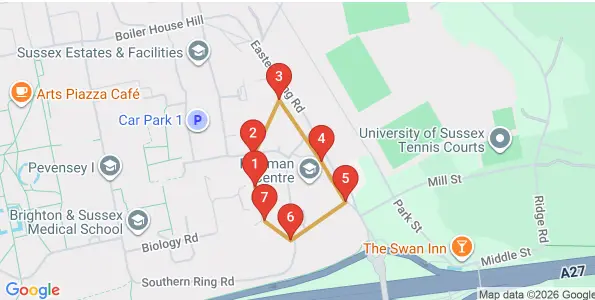
Main entrance checked. Door secure and area clear.
Perimeter and parked vehicles checked. No issues found.
External route covered. Lighting operating normally.
Product tour
Watch a quick walkthrough of the patrol workflow, from starting a tour to recording checkpoints and completing the report.
Video playback requires an internet connection.
Reviews
“I love how easy the app is to use. No setup required, just download and go”
“The report feature is fantastic. I get a full review sent directly to my inbox after every patrol, showing exactly where the guards have checked in. It gives me complete visibility and confidence that every checkpoint has been visited.”
“Using NFC tags makes patrols so much easier. Quick tap, accurate check-ins, no hassle.”
Ready for the next patrol?
Download StudioGuard Tour for Android or open the app guide for setup instructions.